Hiking Logbook - KDP Interior: Practical Tips for a Polished, Profitable Book
Stepping into the world of KDP publishing with a niche product like a hiking logbook is a smart move. Outdoor enthusiasts appreciate a dedicated space to chronicle their treks. The Hiking Logbook - KDP Interior promises a streamlined path to publication with its pre-formatted files. Yet, a smooth journey from PDF to printed product hinges on understanding a few critical details that many creators, especially beginners, tend to overlook. This article walks you through what to watch out for so you can release a book that looks professional and functions perfectly for its user.
Understanding What’s Included and How to Use It
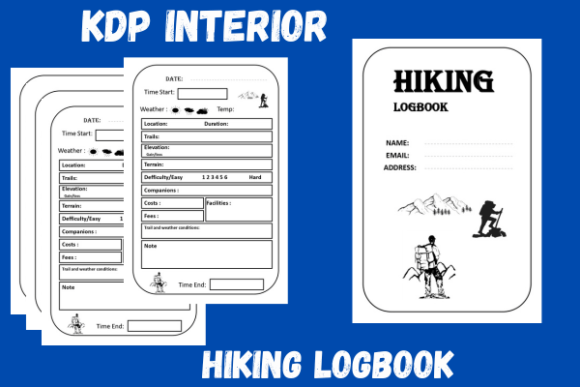
The offering is clear: a 1.READY TO UPLOAD PDF FILE, 2.6 9 inches trim size, 3.120 total pages, a 4.PPT FILE, and 5.2 pages jpg. Many people focus exclusively on the PDF and ignore the PPT and JPGs. This is a missed opportunity that limits your control over the final product.
The PPT file is your customization engine. The PDF is a flawless printout, but the PPT allows you to personalize. Want to add a custom “In Case of Emergency” page or an introduction about trail safety? Need to adjust a prompt from “Miles Hiked” to “Kilometers Walked”? The PPT is your tool. A common mistake is assuming you must accept the template exactly as offered. Instead, use the PPT to tailor the logbook to a specific audience—whether that is casual day hikers or serious thru-hikers. This small step significantly increases the perceived value of your book.
The JPG files are your marketing assets. Use them to build a compelling A+ Content page on Amazon or as eye-catching social media posts showcasing the interior layout. Showing a clean, well-organized 6x9 inch log entry helps customers visualize the product, reducing returns and increasing conversion rates. Ignoring these files means leaving marketing potential on the table.
Gutter and Margin Misalignment
For a 6x9 inch perfect-bound book with 120 pages, the gutter—the margin closest to the spine—must be generous enough for easy writing. If it is too narrow, the user will struggle to record notes near the center of the book. Check the PDF carefully. Does it provide adequate space? You can test this by printing a single spread of two facing pages and seeing if the text or lines disappear into the spine. A well-designed logbook handles this requirement automatically, but you should verify it before uploading. Nothing frustrates a buyer more than a journal they cannot write in comfortably.
Bleed or No Bleed? A Costly Confusion
Printing costs for a 120-page, 6x9 inch book are calculated by page count and ink coverage. If your interior has a border or background design that extends to the edge of the page, you must select the “bleed” option during setup, which slightly increases the printing cost. If the interior is a clean, no-frills logbook with just lines and text, it is almost certainly a no-bleed project. Uploading a no-bleed file as a bleed file—or vice versa—will cause the system to flag errors or produce a book with unsightly white borders. Understand which type you have. The ready-to-upload PDF usually has this clearly built in, but double-check the margins in the file properties.
Font Rendering and Embedding
This is a silent killer of KDP interiors. Specialty fonts that are not embedded in the PDF will be substituted by Amazon’s printing system. Your beautiful headers can turn into garbled default fonts overnight. Ensure the PDF is exported with fonts embedded. The KDP Previewer tool will explicitly warn you about missing fonts. Do not ignore this warning. If you are using the PPT file to customize, convert any unusual fonts to standard system fonts like Arial or Garamond, or ensure they are properly embedded in your export settings. A logbook is a functional tool, so readability matters more than decorative fonts.
Optimizing Page Count for Your Audience and Royalty
120 pages is a strategic length. It is thick enough to feel like a serious journal but light enough to toss inside a backpack. However, the layout of those 120 pages matters more than the total count. A standard logbook might have a page for every hike or a spread for each week. Check the template’s density. Does it give enough space for detailed notes on weather, wildlife, and companions? If it feels cramped, the user experience will suffer.
A frequent oversight is failing to calculate the exact printing cost before setting a price. For a 120-page black-and-white paperback on cream paper, the printing cost is approximately $4.60 to $5.00 at current rates. If you price your book at $8.99, your royalty is decent. If you price it at $5.99, you might barely break even after Amazon’s cut. Understanding the interplay between page count, print cost, and list price is essential for profitability. The Hiking Logbook - KDP Interior gives you a great starting point at 120 pages, but always run the numbers through the KDP pricing calculator to confirm your margins.
Designing for the Trail, Not Just the Shelf
Your buyer is a hiker. They are purchasing this logbook to use it outdoors, often in imperfect conditions. This imposes specific design requirements. Does the layout have clear, concise prompts that are easy to read at a glance? A mistake I see frequently is logbooks with overly complex layouts that ask too many questions. A hiker finishing a long day just wants to jot down distance, elevation gain, and a brief memory. If the template asks for too much detail, it becomes a chore to fill out consistently.
Look at the interior critically. Does it respect the user's time? If it includes room for a small photo or sketch, that is a bonus. Ensure the prompts are universal enough for different types of hikes—day hikes, multi-day treks, and summit climbs. Another overlooked detail is the date format. Since Amazon sells globally, consider whether the template uses MM/DD/YYYY or DD/MM/YYYY. Using a clear, written format like “May 12, 2024” avoids confusion for international buyers. These small design decisions demonstrate care and directly impact customer satisfaction and reviews.
How to Validate and Share Your Creation
The product description states, “To assure quality, files were tested on Amazon KDP.” This is a significant advantage. It means the initial file structure has already passed Amazon’s automated checks. However, your specific customization—or the options you choose during upload—can still introduce issues. Trust, but always verify.
Here is your pre-launch checklist:
- Upload the PDF to KDP early. Do this as a new title. Select 6x9 inches. Verify the page count matches 120.
- Run the KDP Previewer. Flip through every page. Look for font errors, missing elements, and gutter alignment.
- Check the “Look Inside” file. Use one of the JPG files to set a compelling preview that shows the full page layout.
- Print a proof. Order a physical proof if possible. The feel of a 6x9 inch book in your hands is invaluable. Write in it. Test the space.
Once your book is live, the community aspect becomes important. The request to share the project you created is an invitation to build trust and inspire others. Post a photo of your finished book in a natural setting—on a trailhead or next to a hiking boot. This social proof is incredibly powerful for future buyers. It moves the product from an abstract template to a real, tangible item that someone found valuable enough to assemble and share.
The Hiking Logbook - KDP Interior provides a solid, ready-to-upload foundation. By avoiding the common pitfalls of gutter mismanagement, font embedding errors, file format neglect, and user experience oversight, you position yourself to release a product that truly stands out. Pay attention to these details, test thoroughly, and take pride in the finished result. You are not just publishing a book—you are creating a companion that will accompany people on their outdoor adventures for years to come.